Dental Website Design

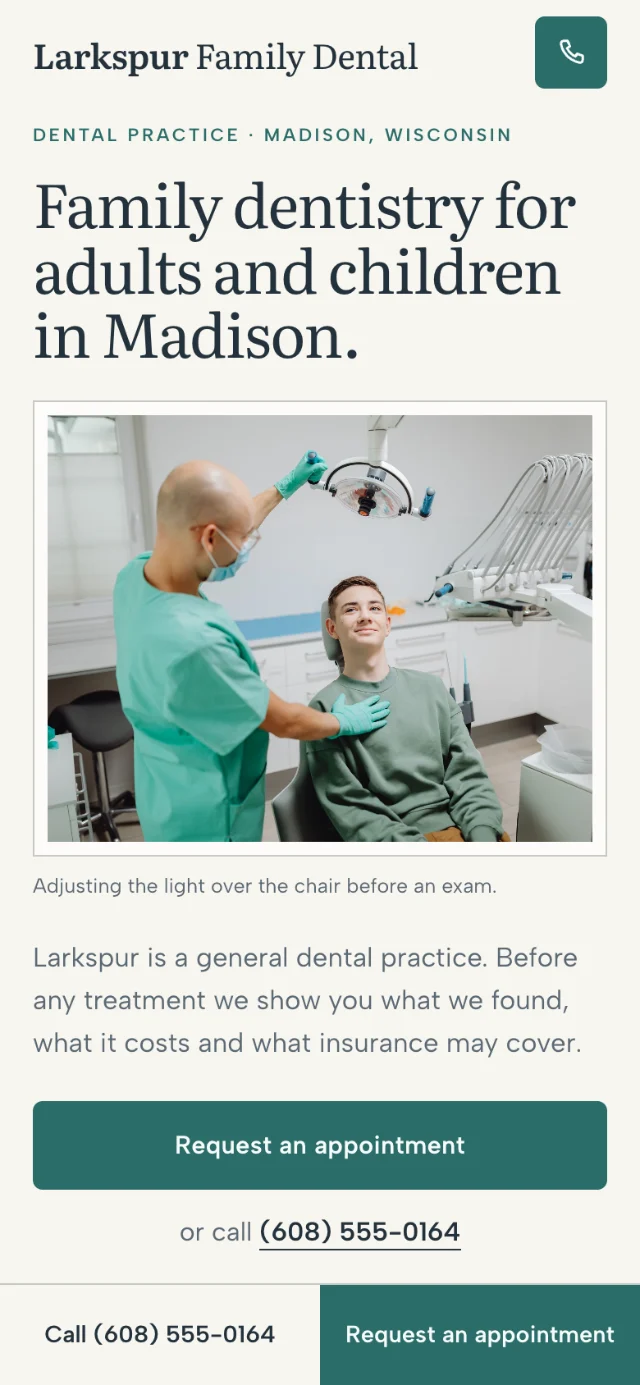
Free. No call. Usually ready in 48 hours.
The phone number and the main button sit at the top of every page.
Example concept: Larkspur Family Dental is a made-up dental practice, and the requests and numbers shown are made up too. Your site is built from your own photos, services and reviews, so it comes out stronger. See real builds
- The Patient
- Insurance, hours, faces, then book
- Usually on a phone
- The Front Desk
- Requests that arrive complete
- No health details in the website form
- The Specialties
- Pediatric to sleep medicine
- Each with its own layout
Rasmussen Results, in Tampa, Florida, designs and builds websites for dental practices across the United States. The practice owns all of it, the site is ready 2 to 3 weeks after kickoff, and it answers what new patients check first: insurance, hours, the team, the office, and how to book.
Tampa, Florida · Remote builds in any US state
The concept
What does a patient check before booking with a new dentist?
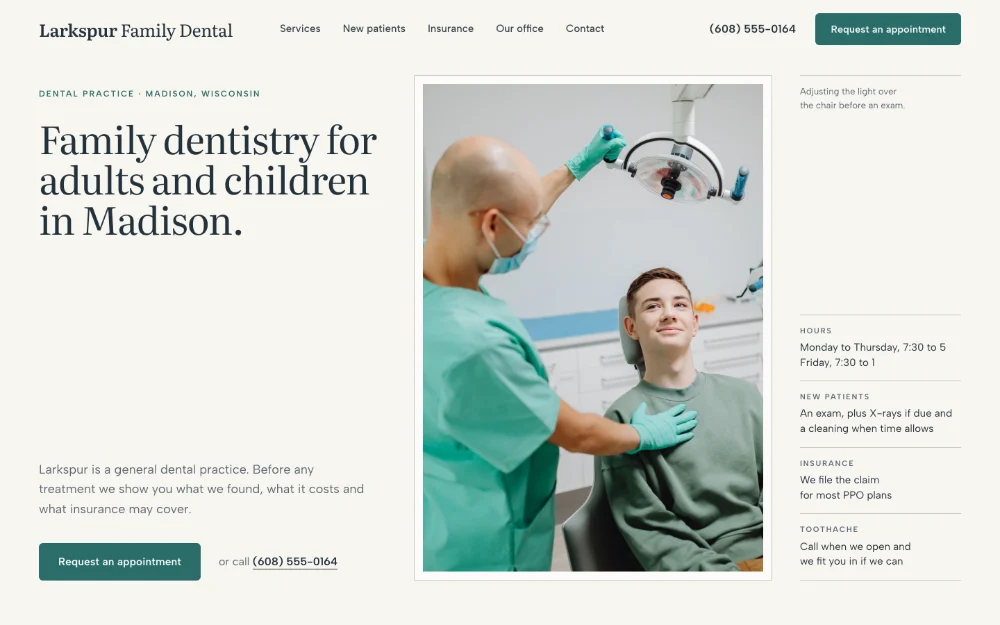
The best dental websites answer five questions in the order a new patient asks them, and a finished build does the same. The example concept above shows one way to start, and the concept gallery shows it beside the other trades.
- 01
Do you take my insurance?
The first question for most new patients. A page that lists the PPO plans you are in-network with, and says plainly what happens if you are out of network, answers it before the phone rings.
- 02
Are you open when I can come?
Hours in the header and on the contact page, with early mornings, evenings or Saturdays called out if you have them. Working parents book around those.
- 03
What does the office look like?
Real photos of the front desk, an operatory and the waiting room. A nervous patient wants to see the room before sitting in the chair.
- 04
Who will I see?
The dentists and hygienists, each with a photo, the school, the degree (DDS or DMD) and a line or two in their own words. Stock smiles of models do the opposite.
- 05
How do I book?
One button, the same on every page, that opens an appointment request or your online scheduler. On a phone it sits within reach of a thumb, next to click-to-call.
The standard build answers all five, with new-patient, insurance, team and treatment pages, for $2,000, paid in two halves: at kickoff and when you approve the site. A larger practice site gets its quote in writing before the mockup, so you hold the figure before any work is done.
The pages
Which pages does a dental practice website need?
Each row is one page: what a patient types, the page that answers it, and what goes on it. Build only the rows that match the dentistry you do and want more of.
- "dentist accepting new patients", "new patient exam"New patients
What the first visit includes (exam, X-rays, cleaning), how long it takes, what to bring, and a link to your secure intake forms so paperwork is done before the patient arrives.
- "dentist that takes [plan]", "dentist without insurance"Insurance, financing and membership
The plans you are in-network with, how out-of-network claims work, your in-house membership plan for patients without coverage, and the financing options you offer.
- "teeth cleaning", "family dentist [town]"General and family dentistry
Cleanings, hygiene recall visits, fillings, crowns and root canals, written so a patient knows what each one feels like and how long it takes.
- "dental implants cost", "implant dentist near me"Implants
Who is a candidate, the steps from consult to final crown, a price range you are comfortable publishing, and the financing that makes it possible for most patients.
- "Invisalign near me", "clear aligners cost"Clear aligners and orthodontics
Aligners versus braces, typical treatment length, what the consult covers, and the monthly payment option if you offer one.
- "veneers", "teeth whitening"Cosmetic dentistry
Veneers, bonding and whitening, with before-and-after photos used only with the patient's written consent.
- "emergency dentist", "tooth pain"Emergency visits
Whether you see same-day emergencies, what to do on the way in, and a call button at the top of the page, because this patient will not fill in a form.
- "pediatric dentist", "kids dentist [town]"Children's dentistry
What happens at a first visit, how you help an anxious child, and photos of the space kids actually sit in.
- "dentist [town]"A page per location or town
Directions, parking, the neighborhoods you draw from and the hours for that office, one page for each location if you have more than one.
- "dentista cerca de mí"Spanish pages
Where your area needs them, the key pages in Spanish, with a note on which team members speak it.
Every page carries the booking button, click-to-call and your hours. The team page and the office tour use your own photos, and the design meets the basics of accessibility: readable contrast, alt text on every image, a site you can use with a keyboard alone, and captions on any video. Getting these pages found in your town is the job of SEO for dentists; paid search is covered on Google Ads for dentists.
Booking and forms
Online booking and new-patient forms, without putting patient data on the website.
The request form
Name, phone, email, preferred days and times, new or returning patient, and a box for "anything we should know" that warns patients not to include health details. It lands in the front desk inbox. Short enough to finish on a phone in under a minute.
Your scheduler
If your practice software offers online booking, the button opens it, and the patient picks an open chairside slot directly. If you would rather the front desk control the hygiene schedule, the button opens the request form instead. You can change your mind later without a redesign.
Intake and medical history
Medical history, medications and insurance IDs belong in the secure forms or patient portal your practice already pays for. The new-patient page links to it with clear instructions, so the paperwork is done before the new-patient exam and none of it passes through the website.
Insurance shapes the rest of the build. If you are in-network with a handful of PPO plans, they are listed by name. If you are fee-for-service, the page says so plainly and explains your membership plan and financing, so the patient who was going to ask "do you take my insurance?" reads the answer first.
Specialty practices
Website design for pediatric, orthodontic, oral surgery, implant and dental sleep medicine practices.
A specialty practice has a different first visitor, and often a second audience: the dentist or physician who refers. Here is what changes for each.
- 01
Pediatric dentistry
The buyer is the parent. The site leads with what a first visit looks like, the age to start (the American Academy of Pediatric Dentistry recommends a first visit by the first birthday), how you handle nervous kids and kids with special needs, and bright, real photos of the treatment area. Parents compare several offices on a phone, often at night, so the request form has to be short.
- 02
Orthodontics
Most patients arrive as a referral or a parent's search. The site needs a free-consult offer if you have one, braces versus aligners explained without jargon, typical treatment length, monthly payment options, and a referral page for general dentists who send you patients.
- 03
Oral surgery
Two audiences: the referring dentist and the patient who was told to call you. That means a referral form for offices, pages for wisdom teeth, extractions, implants and bone grafting, plain sedation and anesthesia information, and printable pre-op and post-op instructions.
- 04
Implant practices
The implant shopper compares price and trust across several offices. The site shows the process from consult and 3D scan to the final crown, a published range or a clear "from" price, financing, and a gallery of finished cases shared with consent.
- 05
Dental sleep medicine
A patient who snores, or who cannot tolerate a CPAP machine, needs the path explained: a sleep study and a physician's diagnosis, then an oral appliance fitted by you. The site carries that path, a short self-check the patient can read, a page for physicians who refer, and a plain note on how medical insurance billing works in your office.
DIY or template
Can you build a dental website yourself? Where a DIY site or a template stops.
What a builder template does fine
A new pediatric or general practice with one location can launch a decent site on a website builder in a weekend: a homepage, hours, a map, a phone number and a short list of services. If that is all you need for the first few months, do it, and spend the money on the chairs.
Where it stops
It stops at the pages that win patients: a real page per treatment, an insurance page you keep current, specialty and referral pages, Spanish pages, an office tour that loads fast on a phone. Bundled sites from dental marketing companies add those, but the files, and often the domain, are held in the company's account, not the practice's.
Across every trade we have checked, 30.8% of local businesses still have no website at all (the study). If your practice already has a site, the questions are whether it books patients and whether you own it. More on medical-practice search in local SEO for medical practices.
The price
How much does a dental website cost here?
The website is $2,000, paid once, with the new-patient, insurance, team and treatment pages above built in. There is no required monthly fee from me; hosting usually costs $0 within Google's free allowance. SEO after launch is optional and separate: quoted in writing for your practice, month to month, and measured in your own Search Console.
| Who builds it | Price |
|---|---|
| An independent designer | $2,500 to $8,500 |
| A U.S. web design company | $5,000 to $12,700 |
| Thryv's Signature plan | $399 a month, $14,364 over three years |
The U.S. company rate is from Clutch's web design pricing guide (opens in a new tab) (updated September 21, 2026) and the Thryv price from Thryv's pricing page (opens in a new tab), both checked November 2, 2026. The hours are my estimate, and so is the independent designer rate. See the math in the website cost calculator.
The short version
Last updated:
- Price
- $2,000one time
- Monthly fee
- None required by me. Hosting usually costs $0 within Google's free allowance; a busy site might pay Google a few dollars a month. Maintenance is optional.
- Timeline
- 2 to 3 weeks from kickoff to a live site
- First step
- A free homepage mockup, so you see the design before you decide anything
See what you own and everything included
- You own
- The domainat your own registrar, renewing to you
- The codea GitHub repository in your name
- The hostinga Firebase project in your Google account, usually $0, with any charge billed by Google to you
- Google Analytics and Search Consoleproperties under your Google account
- Your Google Business Profileyou are the owner, and I am a manager you can remove
- Every form submissiondelivered to the inbox you choose
All of it in your name from day one. I am added as a collaborator for the build and removed by you at handover, and I never hold the only copy of any login.
- What's included
- An appointment request form and a link to your scheduling tool
- A new-patient page linked to your secure intake forms
- Insurance, financing and membership plan pages
- Team bios with credentials and an office tour
- A page for each treatment you want more of
- Click-to-call, Google Business Profile, GA4 and Search Console set up
- Set up on Bing too: Webmaster Tools, which reports how your pages show up in Microsoft Copilot, and Bing Places
How it runs
Leaving a dental marketing subscription, in three steps.
1. The mockup
Send me your practice's name and town, and your current site if you have one. I design a homepage for your practice and send a link you can open on your phone and show your office manager. No call, nothing to sign.
2. The build
If you like it, we pick the pages from the schedule above. I write and build them, connect the booking button and the intake link, and map every old address to its new page so nothing that ranks is lost. You approve each page before launch.
3. The switch
The domain moves into your name if it is not already, the site goes live, and GA4 and Search Console are running from day one. Then you cancel the old subscription. Check the speed yourself in PageSpeed Insights.
Finished builds for other businesses are on the portfolio, and the full terms are on the pricing page.
Q&A
What dentists and office managers ask before a redesign.
Other industries and services are listed on the industries page.
What should a dental website include?
A new-patient page, an insurance and financing page, team bios with credentials, real office photos, and a page for each treatment you want more of. Add a booking button on every page, click-to-call, your hours in the header and a link to your secure intake forms. Specialty practices add referral pages for the dentists and physicians who send patients.
Can my website take appointment requests without creating HIPAA problems?
Yes, if the website form stays simple. It asks for a name, a phone number, an email, preferred times and whether the person is a new patient, and nothing about their health. Medical history and insurance details go through the secure forms or patient portal your practice software already provides, linked from the site.
Should my dental website have online booking?
If your scheduling software offers online booking and the front desk is happy with it, yes: the site links to it from every page. If not, a short appointment request form works well, and the front desk calls back to confirm a time. Either way the button looks the same to the patient.
Custom dental website or a template from a dental marketing company?
A template is fine for a practice that needs hours, a phone number and a few service pages. It stops working when you want your own treatment pages, specialty pages, Spanish pages or a site you can move. Many dental marketing templates also stay in the company's accounts, domain included; here the domain, the code and the hosting are in the practice's name from day one.
How much does a dental website cost?
Here it is $2,000 once, for the site, the treatment pages and the setup, with no required monthly fee from me. Many dental marketing companies charge a setup fee plus a monthly subscription that bundles the site with other services. Ask what you keep if you stop paying, and compare on that.
Can you move my site off my current dental marketing company and keep my domain and rankings?
Usually, yes. If the domain is registered in your name, it moves with you; if the company registered it, ask them to transfer it before you cancel. I rebuild the pages, keep the addresses that already rank or redirect them to the new ones, and set up Search Console so you can watch the switch.
Accepting Dental Practices
Send me your practice's name and town.
I will design a free homepage for your practice, with the insurance answer and the booking button on the first screen, and send it back for you to judge on your phone. Prefer to talk first? Call or email.
Or call (813) 531-8442 or email chris@rasmussenresults.com.